ManualWorkspace
Previews, slides and export
Preview and present slide decks, draw Mermaid and Excalidraw diagrams, view JSON and CSV, and export to PDF.
What you can do
- Write a slide deck as one Markdown file, a page break between slides.
- Preview the deck beside your work, or present it fullscreen.
- Draw diagrams from text in
mermaidfences, or by hand on an Excalidraw canvas. - Browse JSON as a tree, and edit CSV and TSV as a table.
- Export a document or a deck to PDF, diagrams and images included.
Preview and present
Markdown needs no preview: headings, links, images, tables, and diagrams render while you edit. A slide deck adds two views, also offered as buttons above its outline.
| Command | macOS | Windows, Linux | Shows |
|---|---|---|---|
| Preview slide deck | Cmd+Enter | Ctrl+Enter | The deck over the window, one slide at a time, with arrows and a counter. |
| Present slide deck | Cmd+Shift+Enter | Ctrl+Shift+Enter | The deck fullscreen, without arrows or counter. |
| In either view | Key |
|---|---|
| Next slide | Right Down Space |
| Previous slide | Left Up Backspace |
| Close | Esc, or a click outside the slide |
Slide decks
-
Start a deck
New slide deck, in the pane menu, opens a new deck as a draft, ready at
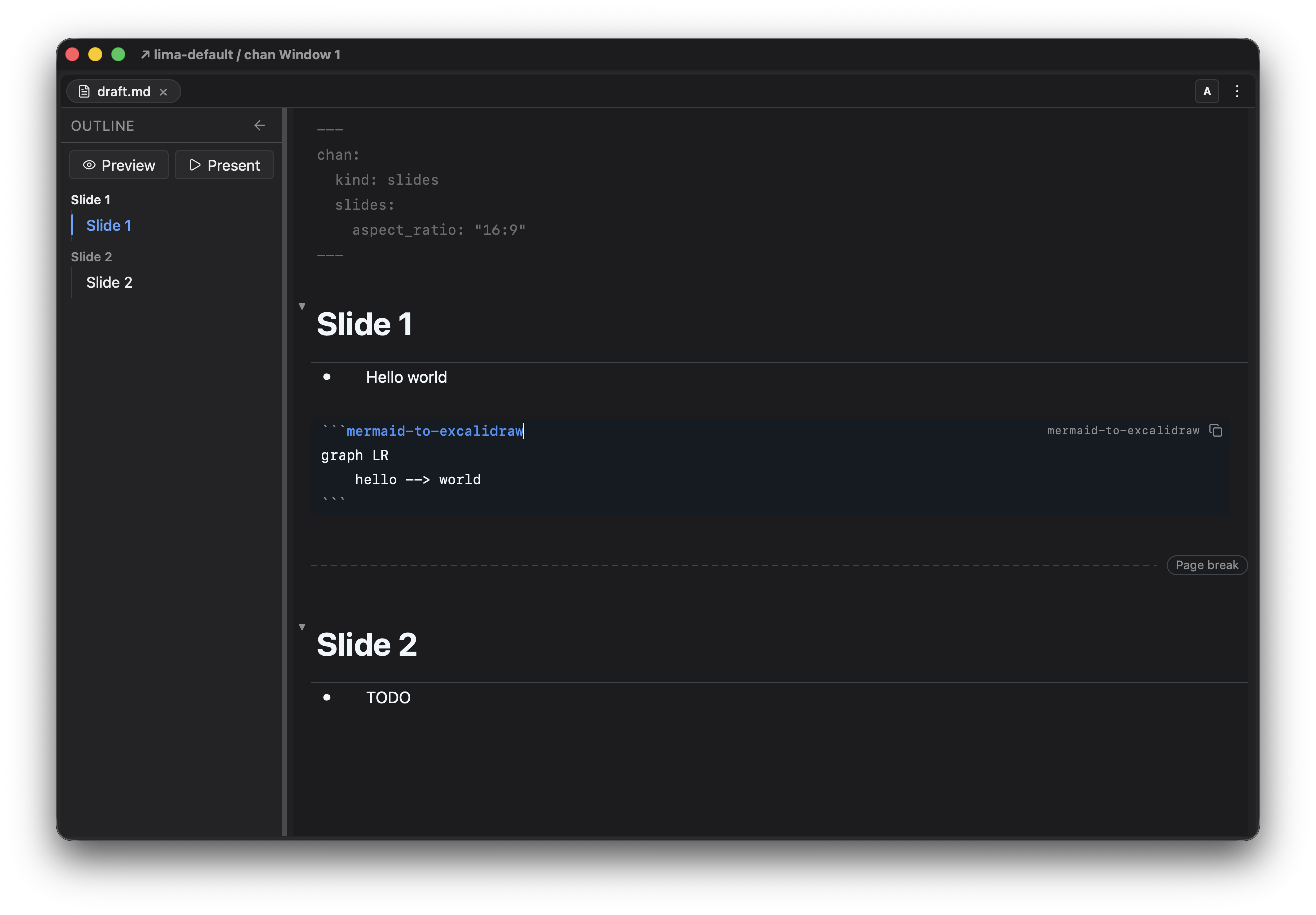
# Slide 1. Or give any Markdown file this frontmatter:--- chan: kind: slides --- -
Split it into slides
Type
@pagebreak, or@break, and press Space or Enter. The line becomes the page break,<hr class="chan-page-break">alone on a line, which starts the next slide. -
Set its shape, if you like
The
slides:block is optional, and so is each field:--- chan: kind: slides slides: aspect_ratio: "16:9" zoom_factor: 2 ---Field Takes Default aspect_ratio"16:9"or"4:3""16:9"zoom_factorA number that scales the slide content, or a percentage such as "150%"2
Diagrams
| Write | You get |
|---|---|
A code fence tagged mermaid | A Mermaid diagram, rendered in place. |
A fence tagged mermaid-to-excalidraw | The same Mermaid source, drawn in Excalidraw's hand-drawn style. |
A .excalidraw file | A drawing canvas. Open it from the file browser or with cs open. |
 in a note | The drawing, embedded. |
| New diagram, in the pane menu | A new drawing, as a draft. |
```mermaid
flowchart LR
  spec --> draft --> review
```
JSON and CSV
Source mode switches any of these between the view and the text.
| File | View | To edit |
|---|---|---|
.json | A tree of its objects and arrays, each one expandable | Switch to Source mode. A file that does not parse still saves, and the tree shows the parse error. |
.csv, .tsv | A table | Edit a cell in place. For anything else, such as columns or sorting, switch to Source mode. |
| Other text | None | The source editor. |
Export to PDF
| From | The PDF goes to |
|---|---|
| Export to PDF in the command launcher, on a Markdown file or its file browser row | The machine you are at: your Downloads in Chan Desktop, a download in a browser. |
cs export FILE in a workspace terminal | The workspace, beside the source with .pdf in place of its extension. --out PATH picks another path. |
$cs export notes/design.md$cs export decks/kickoff.md --out out/kickoff.pdf| Source | PDF layout |
|---|---|
| A document | A4 portrait pages with 0.65 inch margins. A page break forces a new page. |
| A slide deck | One slide per A4 landscape page, laid out at 1920 by 1080, or 1440 by 1080 for 4:3. A slide that overflows is scaled down whole. |
Images, Mermaid diagrams, and Excalidraw embeds render into the PDF as the editor shows them.
Details and limits
@pagebreakexpands only as you type in the rendered editor. Written into a file any other way it stays text, and only the<hr>line splits slides.- Any
aspect_ratioother than"16:9"or"4:3"makes the file a document, not a deck. - In the rendered editor, Cmd+Enter first opens the calendar of a date pill at the caret, or leaves a fenced block, before it previews the deck.
- Present slide deck makes Chan Desktop's window fullscreen; a browser may refuse fullscreen and play the deck in the page.
cs exportrenders in an open workspace window: the terminal's own, else the one that joined last. With no window open it refuses.- A standalone terminal refuses
cs export; it needs a workspace window. - On a devserver,
cs exportwrites the PDF there;cs downloadbrings it to your machine. See Transfers. cs exportreplaces an existing file at the output path without asking.- It gives up, with exit status 1, after 90 seconds without a finished page or 15 minutes in all.